
 Talkward × Salesforce
Salesforce next to every conversation
Next to every conversation your team sees what Salesforce knows about the person: account, owner, open opportunities and cases. Create leads, contacts and cases in one click, and closed conversations are logged as a task on the contact. For chat, email and WhatsApp.
Sound familiar? Three moments where support and sales miss each other.
Salesforce knows everything about the customer, the inbox knows nothing. In between: tabs, copy and paste, and messages in the team chat.
Two windows for one customer.
A message comes in, and first someone searches Salesforce: is this an existing customer, is there an open case, who owns the account? For every single request.
Retyping instead of replying.
Name, email, company and half the conversation are copied into a lead or case by hand. That costs minutes, and half of it is still missing.
Sales has no idea about the trouble.
The account manager calls about the renewal while the customer has been waiting two days for a replacement of a damaged delivery. The CRM says nothing about it.
With Talkward the Salesforce card sits right next to the conversation. Creating and logging happens from the thread, with the data that is already there.
Four moves that feed Salesforce
What your team does straight from the conversation.
Everything sits in the customer record next to the thread, on the web and in the Talkward app.
See who you are talking to
Contact or lead, account with type, owner, open opportunities with their stage and all cases. Matched by email or phone number.
Create a lead or contact
New inquiry, not in the CRM yet? One click, name and email are filled in, the company comes from the email domain if needed.
Open a case
A complaint becomes a case with subject, priority, your note and the full transcript. The case number appears in the conversation.
Log it when you close
Close the conversation and it is logged as a completed task on the contact or lead. Sales sees what support discussed before the next call.
How teams on Salesforce use the integration.
Salesforce runs wholesale, manufacturing, software, car dealerships, insurers and universities. Six flows that happen there every day.
-
Wholesale and distribution
A regular customer reorders on WhatsApp.
A buyer asks about volume pricing for the next delivery. Your team sees at once: account “Customer, direct”, framework contract in negotiation, owned by Jonas. The request reaches him with context instead of getting lost.
- WhatsApp request
- Account and opportunity in the record
- Jonas takes over
-
Machinery and plant engineering
A breakdown becomes a case with history.
An operator emails that a machine is down. One click creates a case with priority “High” and the full transcript. When the customer later asks for an update, the AI knows the status once their email address is verified.
- Breakdown report by email
- Case with high priority
- Status to the customer
-
Software and SaaS
A question on the pricing page becomes a lead.
Someone asks in chat about single sign-on and enterprise terms. An automation spots the tag “Enterprise” and creates the lead, the company comes from the email domain. Sales sends the demo slot from the same conversation.
- Chat on the pricing page
- Lead via automation
- Demo appointment
-
Car dealerships and mobility
The test drive request reaches the salesperson.
A prospect asks on WhatsApp about a demo car. Your team creates her as a lead, the channel is in the lead. After the chat the transcript is a task in the CRM, and the salesperson calls prepared.
- WhatsApp: test drive?
- Lead for sales
- Transcript as a task
-
Insurance and finance
The claim report is documented properly.
A customer reports a claim by email. The case is created with the full transcript, linked to their contact. The AI only shares case status once the identity is verified and never sees amounts or contracts.
- Claim report by email
- Case on the contact
- Handling with history
-
Universities and education
Prospective students no longer slip away.
Questions about deadlines and admission come through the web chat, often in the evening. The AI answers what is in the knowledge base, and new prospects land as leads with student advisory, their question in the transcript.
- Question in web chat
- Lead “Prospect”
- Advisory gets in touch
How the integration worksSalesforce stays the source of truth.
You sign in to Talkward once with a Salesforce user, in production, a sandbox or your own My Domain. Talkward gets exactly that user’s permissions. The card in the customer record reads Salesforce when needed and keeps the result for ten minutes; it only writes what you switch on: leads, contacts, cases and tasks. Which fields are filled is set in the field mapping.
Sign-in, revocable at any time
OAuth with PKCE via Salesforce’s own sign-in page. Production, sandbox or My Domain. Disconnecting revokes the sign-in; Talkward stores no password.
Field mapping with a test run
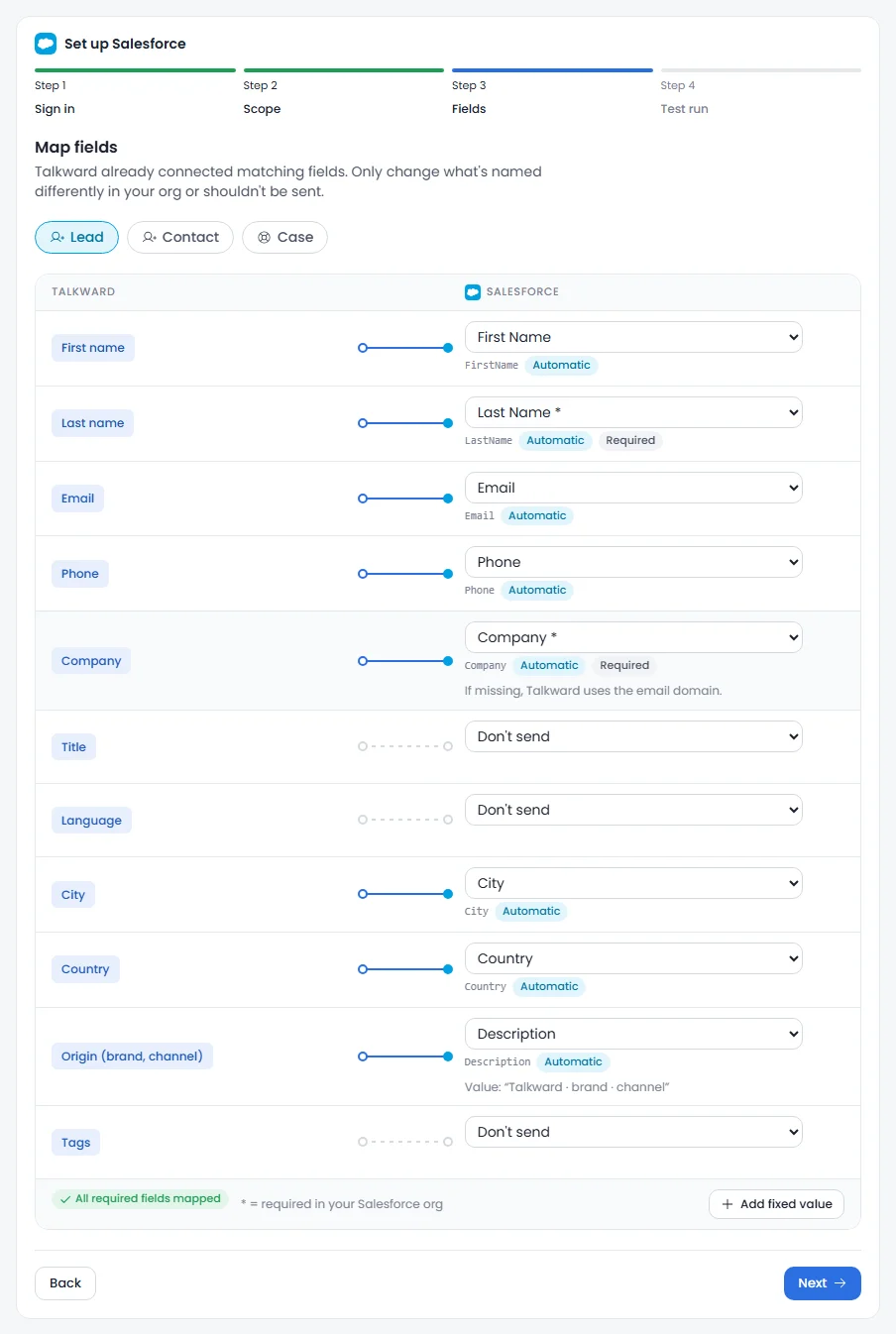
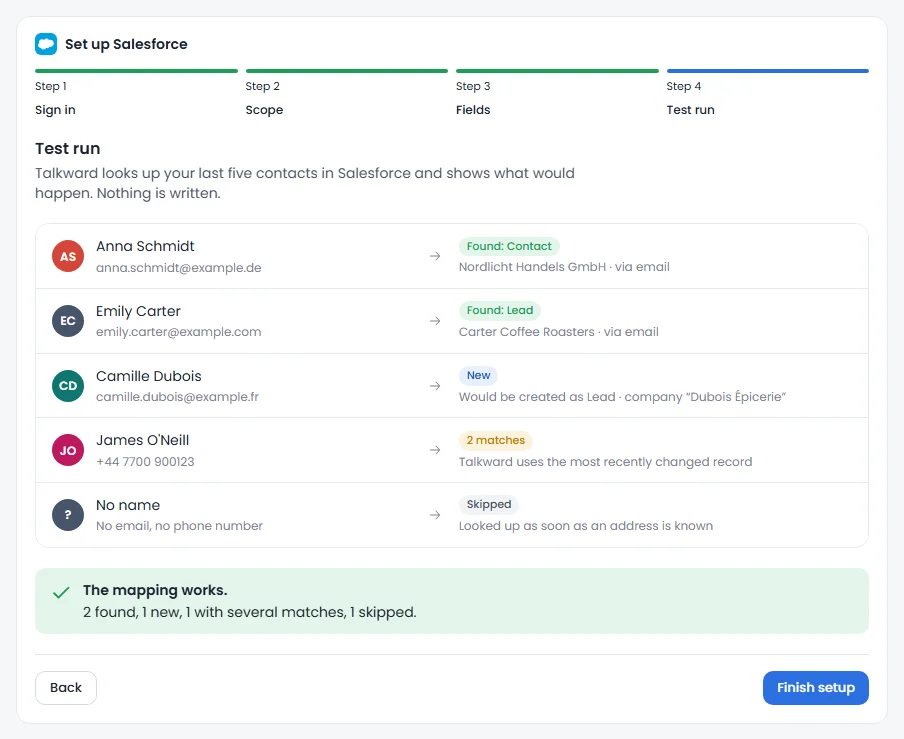
Matching fields are connected already, your org’s required fields are checked, fixed values work too. The test run looks up recent contacts without writing anything.
The AI reads, never writes
If you allow it, the AI agent knows account, account type and open cases. Only with a verified email, never revenue or opportunities.
In automations
Conditions like “account type is customer” or “open cases greater than 0”, blocks for case, lead and logging. The case number is then available for notes.
- Connection
- Sign-in with your Salesforce user (OAuth, production, sandbox or My Domain), REST API
- Access
- Contacts, leads, accounts, opportunities, cases (read); leads, contacts, cases, tasks (create, only what you switch on)
- Processing
- Nuremberg (ISO 27001), Cologne, Paris. “Europe only” option. Credentials stored encrypted, orders only cached briefly.
The Salesforce card in the customer record.
Right next to the conversation: contact or lead, account, owner, opportunities with their stage path and cases with status. Every entry opens the record in Salesforce. “Sync again” fetches the latest state.
- Contact or lead
- Account and type
- Owner
- Opportunities with stage
- Cases with status
- Lead status
- Account
- Nordlicht Handels GmbH
- Account type
- Customer, direct
- Owner
- Jonas Brandt
- Opportunity
- Framework contract 2027 · €48,000 · Negotiation
- Open cases
- 00001042 · Damaged delivery
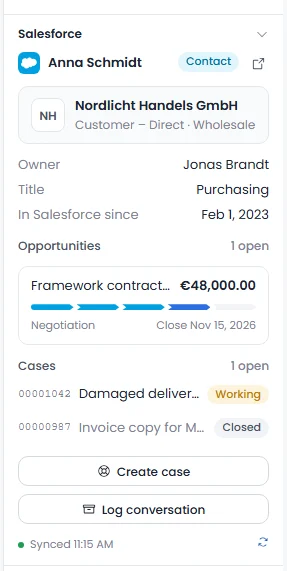
What it looks like in Talkward.
Screenshots from Talkward with a sample org. On the web and in the app your team sees the same card.
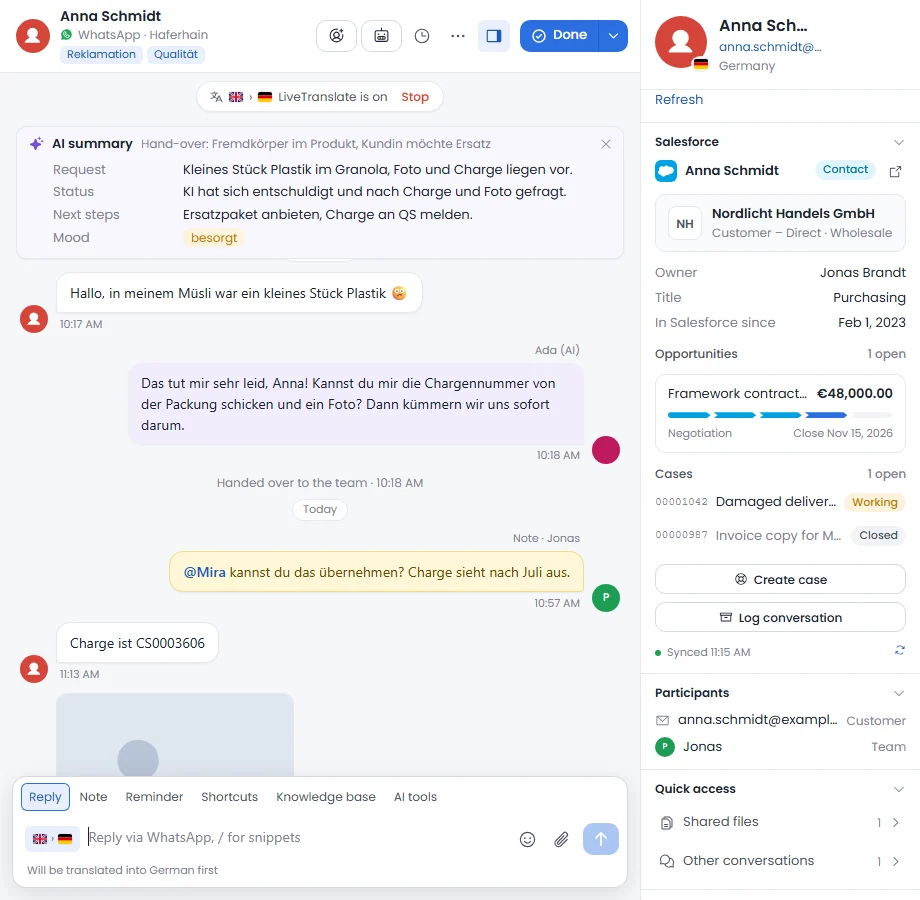
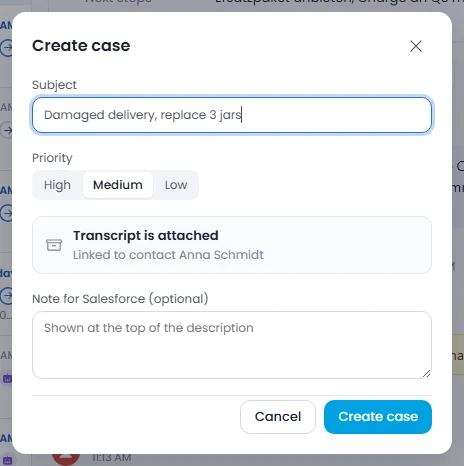
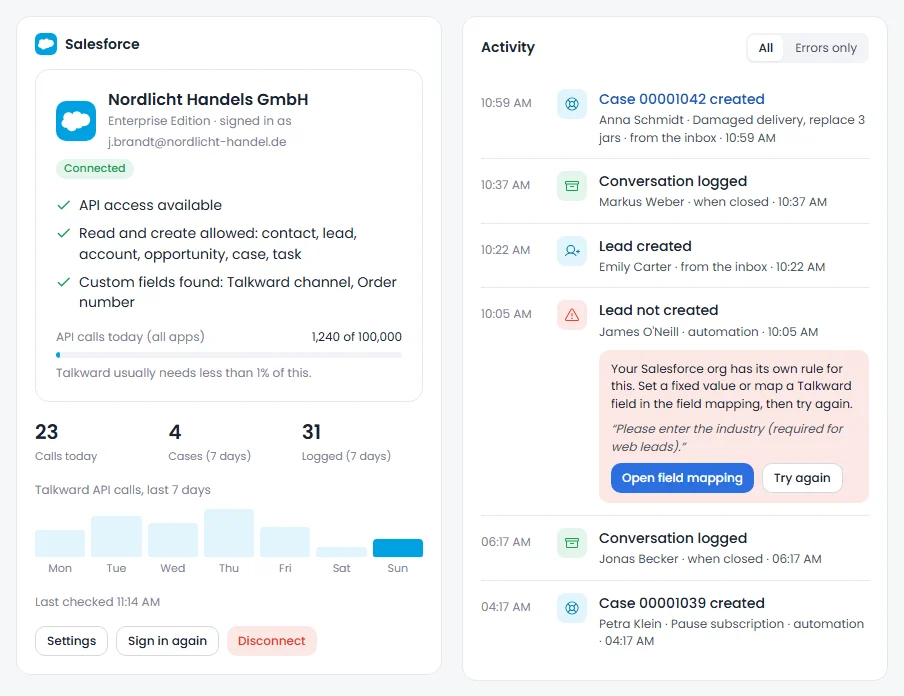
Set up in four steps.
The add-on is included from Professional at no extra cost. Your Salesforce org needs API access; Enterprise, Unlimited and Developer have it, Professional with the “API Access” add-on.
Sign in with Salesforce
Under Settings › Add-ons › Salesforce choose production, sandbox or My Domain and sign in. Talkward checks API access, permissions and custom fields.
Choose the scope
Create as lead or contact, cases, log when closed or only by button, AI access. Every function can be switched on its own.
Check the fields
Talkward suggests the mapping. If a required field of your org is missing, you see it right away and set a fixed value.
Start the test run
Talkward looks up your last five contacts and shows who is found and who would be new. Nothing is written.
“Salesforce” add-on
no extra costfrom Professional, provisional, net
No extra cost from Professional. Your Salesforce licences are billed by Salesforce; Talkward usually needs less than one percent of the daily API allowance.
All plans and prices- Salesforce card in the customer record, on the web and in the app
- Create leads, contacts and cases from the conversation
- Log conversations as a completed task on the contact
- Field mapping, test run and activity log with fixes
- Conditions and blocks in automations
- Servers in Nuremberg (ISO 27001)
- Data processing agreement
- AI replies labelled (EU AI Act)
- Extensions cancellable monthly
Questions about the Salesforce integration
Question not listed? Write to us at hey@talkward.app.
Which Salesforce edition do I need?
One with API access: Enterprise, Unlimited and Developer include it, Professional with the “API Access” add-on. If it is missing, Talkward tells you right after sign-in, and once it is enabled “Check again” is enough.
Does Talkward write to Salesforce on its own?
Only what you switch on. Leads, contacts and cases are created by your team with a click or by an automation you build. Logging on close is a separate switch; without it you log conversations by button only.
What data does Talkward keep from Salesforce?
The card is read when needed and kept for ten minutes so that not every click uses up API calls. Salesforce stays the source of truth. If you disconnect, Talkward deletes the cache and revokes the sign-in.
Does it work with a sandbox and custom fields?
Yes. You choose production, sandbox or your My Domain. The field mapping includes your org's custom fields; Talkward checks required fields and validation rules, and the test run shows the result before anything is written.
Does the AI see revenue or opportunities?
No. If you allow it, the AI agent knows account, account type and open cases with status, and only with a verified email address. It never sees amounts, opportunities or notes, and it never writes to Salesforce.
Does Talkward sync contacts both ways?
Not yet. The card always reads the current state from Salesforce, and Talkward writes when you create or log. A continuous two-way sync is not part of the add-on.
Goes well with
 Calendly integrationBooking link with one click from the conversation, pre-filled. Bookings and cancellations in the conversation and the record.
 Zapier integrationHandovers in Slack, complaints in Sheets, orders as WhatsApp: over 7,000 apps, no code.
 APIConnect your own systems: read conversations, send messages, set fields, webhooks. Documented, your own keys.
- All integrationsShop, ERP, marketplaces, shipping and service
Secureyour seat.
Three details, no commitment. We will get back to you personally within two working days.