Guides · Shopify and section 356a BGB
Withdrawal button in Shopify: set it up without an app and acknowledge it properly
Since 19 June 2026 online stores selling to consumers in Germany need an electronic withdrawal function. Shopify offers its own way through the customer account, without an app. It is quick to set up but does not meet every requirement by itself. Here is what is missing and which part an automation takes over.

Your Shopify store
- Vertrag widerrufenCustomer in the storeThe link “Vertrag widerrufen” sits in the footer of every page.
- Vertrag widerrufenRequest returnWithdrawal in the accountSign in with an email code, open the order, request the return.
- Return requested · #1042Shopify reports the requestImmediately and with the order. Nobody has to read an inbox for it.
Shopify reports to Talkward right away
 Talkward
- Template “Acknowledge a withdrawal”Automation startsThe trigger “Return requested” kicks off the flow.
- We received your withdrawal06/10/2026 · 14:32WithdrawalAcknowledgement to the customerEmail with order number, date and time. The order gets a tag.
- The team knowsPush notification so return and refund can start.Withdrawal received#1042 · Jana K. · 14:32
We have just set up the withdrawal button for one of our own Shopify stores and noticed where Shopify’s way and the German statute drift apart.
In short
- Shopify maps the withdrawal button, without an app, to return and cancellation requests in the customer account. That takes ten minutes to set up.
- This way leaves three points open: the wording of the buttons, access without signing in and the acknowledgement of receipt with date and time.
- An automation can take care of the acknowledgement. The other two points remain a trade-off you should know about.

Contents
- What does section 356a BGB require of the withdrawal button?
- Setting up the withdrawal button in Shopify without an app
- Where Shopify’s solution falls short
- Sending the acknowledgement automatically
- What the automation does not solve
- Checklist: withdrawal button in your Shopify store
- Frequently asked questions
- Sources
What does section 356a BGB require of the withdrawal button?
Section 356a of the German Civil Code (BGB) implements an EU directive and has applied since 19 June 2026 to contracts consumers conclude online. Customers should be able to withdraw from a contract as easily as they concluded it. The electronic withdrawal function, usually called the withdrawal button, has four building blocks:
- Button
Clearly legible and labelled “Vertrag widerrufen” (withdraw from contract) or equivalent, continuously available throughout the withdrawal period, prominent and easy to reach.
- Three details
Name, details identifying the contract and the channel for the acknowledgement. The function must not require more.
- Confirm
A second button “Widerruf bestätigen” (confirm withdrawal) or equivalent that submits the statement.
- Acknowledgement
Without undue delay on a durable medium, for example by email, with the content of the statement and the date and time it was received.
Setting up the withdrawal button in Shopify without an app
Shopify recommends mapping the withdrawal function to customer accounts. The customer signs in, opens the order and requests a return there or, before shipping, a cancellation. You set up four things in the Shopify admin:
- Turn on self-serveEnable “Return and cancel requests” in the customer account settings.
- Set cancellation rulesTurn on cancellation rules and set the window to “Until item is fulfilled”.
- Set the return windowAt least 14 days, starting from delivery of the last item in the order.
- Make the link visibleAdd a footer entry “Vertrag widerrufen” that leads to the order overview in the customer account.
Also add a sentence describing the online route to your withdrawal policy. Shopify itself points out that these tools do not automatically make a store compliant.
Where Shopify’s solution falls short
Put next to the statute, three points remain open:
| Requirement | Shopify’s way | Assessment |
|---|---|---|
| Labels “Vertrag widerrufen” and “Widerruf bestätigen” | You name the footer link yourself. The buttons in the customer account carry Shopify’s own wording for returns and cancellations. | Partly met |
| Easy to reach | The customer first signs in with a code sent by email, even for a guest order. | Disputed |
| Acknowledgement with content, date and time | Shopify names the acknowledgement as the merchant’s duty. It does not promise that its own notification contains the date and time of receipt. | Can be closed |
Sending the acknowledgement automatically
The third point is the most tangible: the statute requires an acknowledgement that arrives immediately and states content, date and time. With Talkward’s Shopify extension, which is currently in preparation, an automation takes care of that. Shopify reports every return request to Talkward right away. Talkward sends the buyer the acknowledgement through your brand’s email inbox, tags the order and lets the team know.
Hi Jana, we have received your withdrawal statement.
- Order
- #1042
- Items
- Oat bars, box of 12
- Received
- 06/10/2026 at 14:32
How to set it up:
- Choose the templateUnder Settings › Automations open the template “Acknowledge a withdrawal right away”. It comes with trigger, email, tag and push notification.
- Check the textAdjust subject and text to your tone. Keep the placeholders for order number, items, date and time.
- Repeat for cancellationsA second automation with the trigger “Order cancelled” covers withdrawal before shipping.
- Run through it oncePlace a test order, withdraw through the footer link and check that the email arrives immediately.
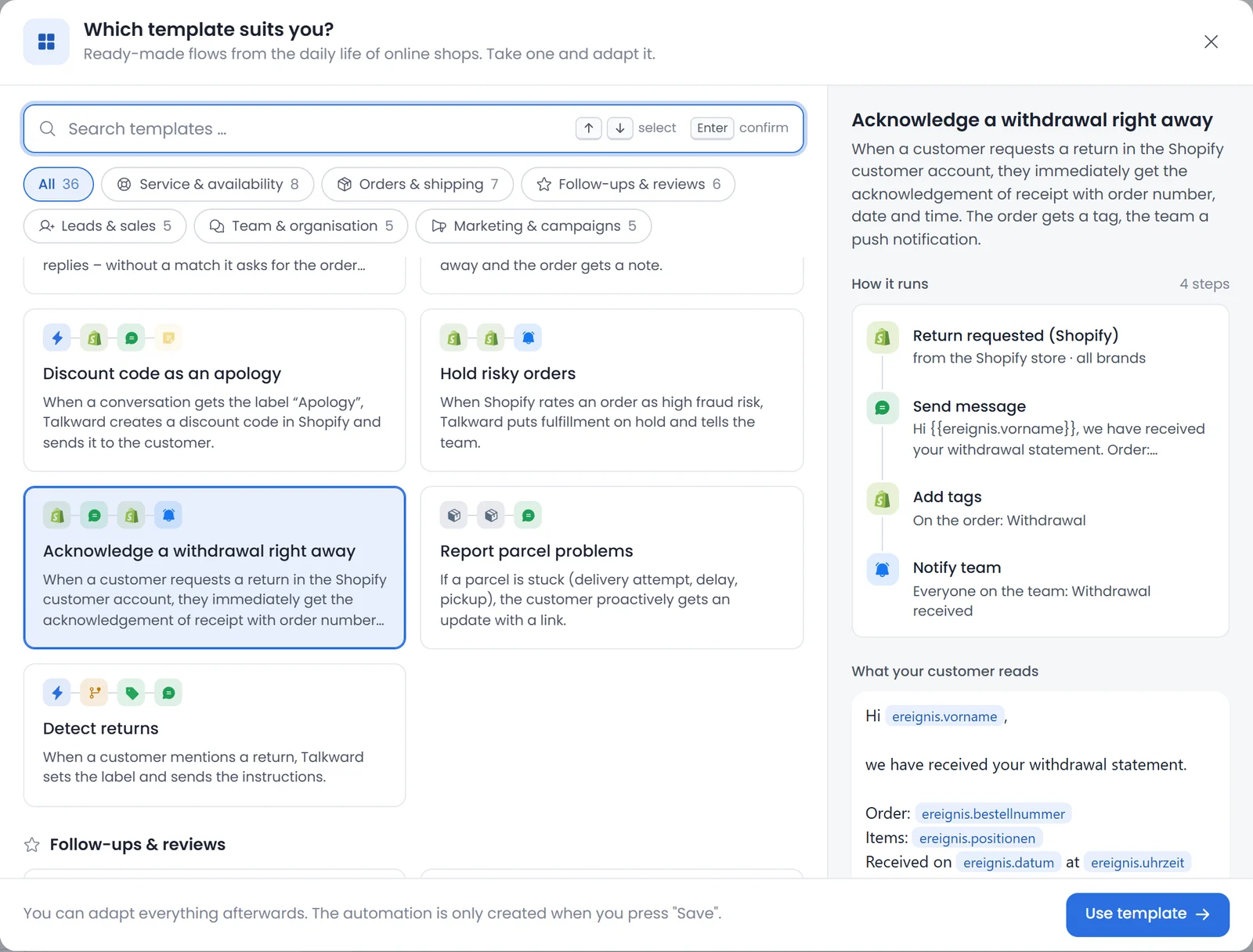
SubjectWe received your withdrawal for order {{ereignis.bestellnummer}}
Hi {{ereignis.vorname}},
we have received your withdrawal statement.
Order: {{ereignis.bestellnummer}}
Items: {{ereignis.positionen}}
Received on {{ereignis.datum}} at {{ereignis.uhrzeit}} (German time)
We will write to you separately about the return shipment and the refund. If you have questions, just reply to this email.
What the automation does not solve
The automation acknowledges and informs. It changes nothing about the sign-in to the customer account and nothing about the button labels there, both are up to Shopify. It does not refund anything by itself either: you approve the return and the refund as usual.
If you want to meet sign-in and labelling under the stricter reading, you need your own page with a form or an app from the Shopify App Store. Two things help in any case:
- Keep other routes open. A withdrawal by email or letter remains valid. Acknowledge it immediately with date and time as well.
- Describe the route. Say in your withdrawal policy where the link is and that the customer signs in with the email address of the order.
Checklist: withdrawal button in your Shopify store
All ticked. Keep the test email, it is your proof.
This article is general information from a merchant’s point of view and not legal advice. As of October 2026.
Frequently asked questions
Do I need an app for the withdrawal button in Shopify?
Not necessarily. Shopify maps the withdrawal function to return and cancellation requests in the customer account. That way, however, leaves the button wording, access without sign-in and the acknowledgement with date and time open.
Since when is the withdrawal button mandatory?
Since 19 June 2026. It is set out in section 356a of the German Civil Code, which implements an EU directive.
Which stores does the withdrawal button apply to?
To all stores that offer consumers online contracts with a right of withdrawal, regardless of size. Pure business-to-business stores are not affected.
What has to be in the acknowledgement of receipt?
The content of the withdrawal statement and the date and time it was received. It has to arrive without undue delay on a durable medium, for example by email.
May withdrawal require signing in to a customer account?
That is disputed. Shopify’s way requires signing in with an email code. German legal service providers consider mandatory sign-in incompatible with section 356a. We do not know of a court ruling yet.
Does the automation make my store compliant?
It closes one of three gaps: the immediate acknowledgement with date and time. It does not change the sign-in to the customer account or the button labels.
How does it differ from the cancellation button?
The cancellation button under section 312k BGB has applied since 2022 to ongoing contracts such as subscriptions. The withdrawal button under section 356a BGB concerns the right of withdrawal after a purchase in an online store.
Is a withdrawal by email still valid?
Yes. The withdrawal function is an addition, it does not replace the other routes.
Sources
- Section 356a BGB, electronic withdrawal function for distance contracts (German)gesetze-im-internet.de
- Shopify Help Center: EU right of withdrawalhelp.shopify.com
- Shopify Help Center: Return rules, Meeting EU right of withdrawal requirementshelp.shopify.com
- Händlerbund: adding the withdrawal button to Shopify (German)haendlerbund.de