
 Talkward × Claude
Claude Code works for your customer service
A customer reports a bug in the shop, a question is not in your knowledge base, a company wants a quote: your automation hands the job to Claude Code. Claude reads the conversation, does the work with your repositories and tools and reports the result back. The automation carries on with it.
Sound familiar? Three tasks that get stuck in the inbox.
Some requests cannot be settled with a reply. Someone first has to look something up, fix it or calculate it.
The bug waits for the developers.
A customer reports that a voucher code does not work. The report lands on a list, and the developers see it next week. Until then more orders fail.
The answer is nowhere.
The AI does not know the question and hands over. The team digs through the data sheet, replies, and next time the knowledge is missing again.
The quote takes a day.
A company asks for 500 units. Open the price list, find the tier, build a PDF: by the time the quote goes out, they have ordered elsewhere.
With the Claude add-on your automation starts a Claude Code routine at exactly that moment. Claude does the work, your team only reviews the result.
Four jobsClaude works, the automation waits.
The block “Claude Code beauftragen” sends a job text with placeholders like {{kontakt.name}} and {{nachricht.text}} to your routine. Claude reads the conversation through the Talkward MCP server, works for a few minutes and reports “erledigt” or “fehler”. The result is then available as {{claude.ergebnis}}.
Web chat · Lena
Technical bug
Delivered
waiting for the report
done · PR #412
PR #412 for review
- talkward · gespraech_lesen #4812
- searches the shop-theme repository
- Cause: codes are compared case-sensitively
- Fix in checkout/coupon.js, test added
- Pull request #412 opened
- talkward · auftrag_abschliessen · erledigt
Instagram · Tom
Not in the knowledge
Delivered
waiting for the report
done · PR #88
Draft reply for approval
- talkward · gespraech_lesen #4907
- opens datasheets/protein-bar.pdf
- found: ingredient soy protein isolate
- knowledge/products.md updated, pull request #88
- talkward · auftrag_abschliessen · draft reply
Email · Weber LLP
Bulk order
waiting for the report
done · quote 2026-117
{{claude.ergebnis}}
Review the quote
- talkward · gespraech_lesen #4930
- talkward · kontakt_lesen · Weber LLP
- reads prices/volume-pricing-2026.csv
- quotes/2026-117.pdf created
- talkward · auftrag_abschliessen · erledigt
Checkout error rate 12%
yes
waiting for the report
done · cause found
{{claude.ergebnis}}
Anna takes over
- talkward · gespraech_lesen #4951
- reads checkout-service logs, last 30 min
- Cause: the 14:02 update rejects Austrian postcodes
- Fix proposed, pull request #415
- talkward · auftrag_abschliessen · erledigt
The other way roundTalkward in Claude.
Search for “Talkward” in Claude’s connector directory (web, desktop, Cowork) and connect, in Claude Code by command. Then ask Claude about your inbox, for example “Summarise all open complaints from today”, and Claude uses the tools of the Talkward MCP server to do it.
- gespraeche_suchen
- gespraech_lesen
- kontakte_suchen
- kontakt_lesen
- auftraege_offen
- notiz_schreiben
- antwort_senden
- status_setzen
- tags_setzen
- auftrag_abschliessen
Blue: tools that change something. With a “read only” key Claude sends no replies to customers. All about the MCP server
Which of today’s conversations are complaints? Summarise them briefly.
talkward · gespraeche_suchen
talkward · gespraech_lesen × 4
Four complaints today: two broken in transit (#4861, #4870), one wrong flavour (#4874), one delivery missing for 6 days (#4880). Three of them are regular customers.
Reply to the three oldest in our brand voice, as a note for approval.
talkward · notiz_schreiben × 3
Done. #4861, #4870 and #4874 each have a draft as a note. Nothing has been sent yet.
Four routines worth having
What merchants use Claude Code for.
A routine is a saved job in Claude Code with access to your repositories and tools. Talkward starts it with the context of the conversation.
Fix shop bugs
Claude reads the report, finds the cause in the theme or plugin, opens a pull request and reports it back. The team approves, the customer is told.
Close knowledge gaps
If an answer is not in your knowledge, Claude researches data sheets and documents, updates the knowledge file in GitHub and returns a draft reply for the note.
Prepare quotes
Inquiry, price list and volume pricing become a draft quote. It lands as a note in the conversation, sales reviews and sends it.
Investigate incidents
When a system reports an incident via the API, Claude reads the logs, finds the cause and proposes a fix. On-call takes over with all the facts.
How it worksJob out, result back.
The block calls the API trigger of your Claude Code routine with the job text from the automation. The routine runs in your Claude account. Claude connects to your inbox through the Talkward MCP server, reads the conversation and finally reports result and outcome with auftrag_abschliessen. If the automation waits, it continues at the matching output; otherwise the result lands as a note in the conversation.
Sign in with Talkward, disconnect any time
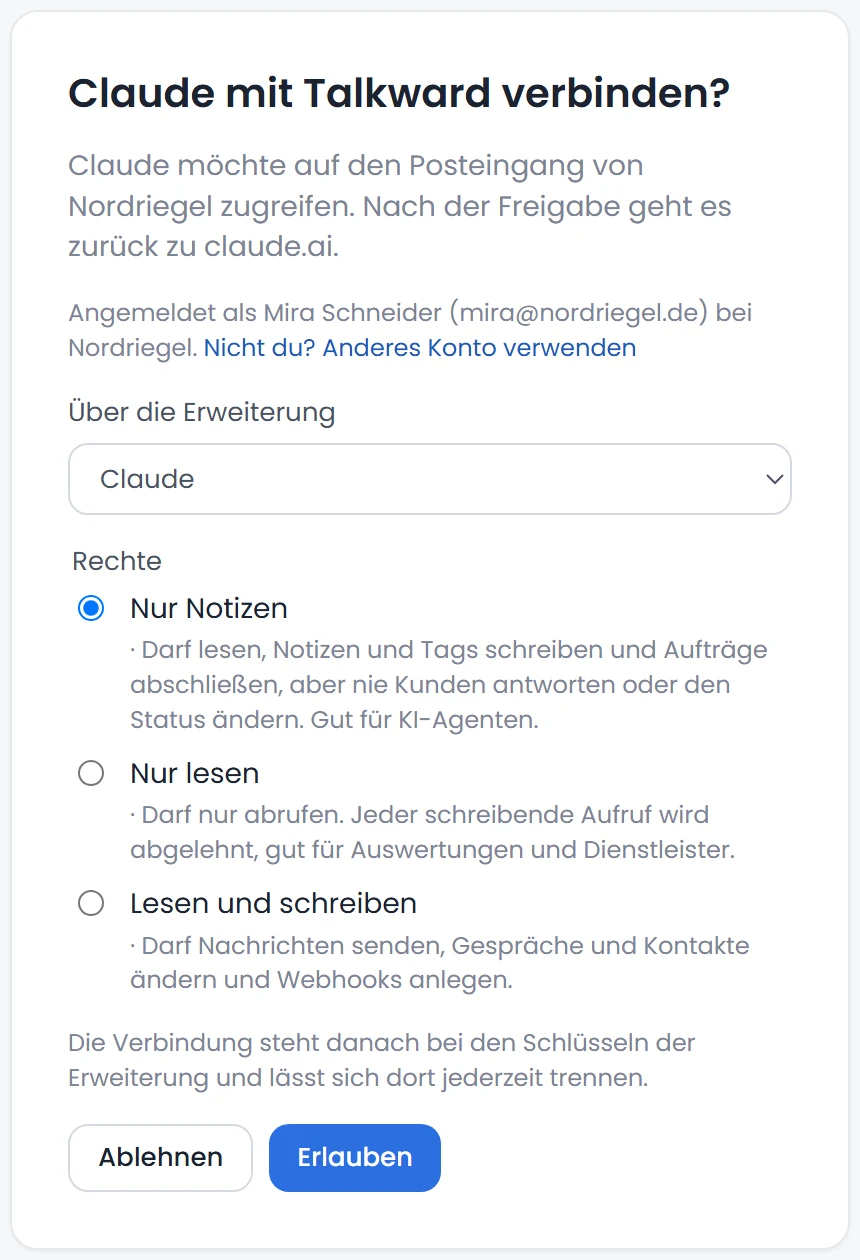
Claude signs in with “Sign in with Talkward” and you choose the rights: “Read only”, “Notes only” (reads and writes drafts, never replies itself) or “Read and write”. The connection’s name shows next to everything Claude does in the conversation.
Waiting with a deadline
“Wait for report” pauses the automation until Claude reports back, at most until the deadline, 60 minutes by default. Outputs: erledigt, fehler, zeit.
Placeholders in and out
The job text can use {{kontakt.name}}, {{nachricht.text}} and more fields. The result is then available as {{claude.ergebnis}} for a message, note or team chat.
Token as a secret
URL and token of the API trigger are stored as an automation secret. Anthropic bills the usage through your Claude account.
- Connection
- Claude Code routine via its API trigger; report back through the Talkward MCP server with its own key
- Access
- Read conversations and contacts, note, reply, status, tags, complete job (depending on the key, “read only” possible)
- Processing
- Talkward: Nuremberg (ISO 27001). Claude: Anthropic in the USA, under your own DPA. The block does not run in brands with “Europe only”.
A job, field by field.
The conversation shows that Claude is working. Everything Claude does through the MCP server appears there with the key’s name, and the result goes to the next blocks.
- Job text with placeholders
- Routine
- Status
- Result
- Output erledigt, fehler, zeit
- Reported by
- Job
- Fix the bug {{kontakt.name}} reports: {{nachricht.text}}
- Status
- done after 4 min
- Outcome
- erledigt
- Result
- Pull request #412: compare voucher codes case-insensitively
- Reported by
- Claude Code · key “Shop routines”
How to connect Talkward in Claude.
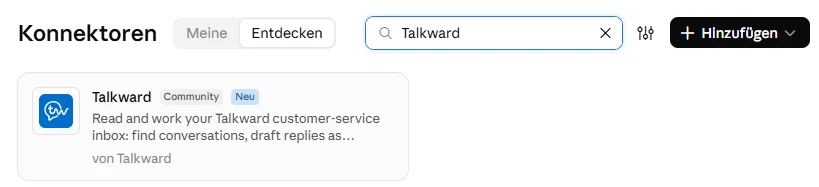
No key to copy, no URL to type: Talkward is listed in Claude’s connector directory. Search, connect, choose the rights, done. Open Talkward in the Claude directory.

Set up in four steps.
The add-on is included from Professional at no extra cost. Talkward is listed in Claude’s official connector directory. For automations you also need Claude Code.
Switch on the add-on
Under Settings › Add-ons switch on the “Claude” add-on.
Search for “Talkward” in Claude
In Claude (web, desktop, Cowork) go to Settings › Connectors › Browse, type “Talkward” and click “Connect with Claude”. Direct link: claude.ai/directory/talkward.
Sign in and choose rights
Talkward opens. Sign in as owner or admin, choose the rights and click “Allow”. Recommended: “Notes only”, so Claude never replies to customers itself.
Claude Code in automations
At claude.ai/code/routines create a routine with your repositories, enable the Talkward connector and add an API trigger. Then drag “Claude Code beauftragen” into an automation and choose “Wait for report”.
“Claude” add-on
no extra costfrom Professional, provisional, net
No extra cost from Professional. Anthropic bills your use of Claude through your own Claude account.
All plans and prices- Block “Claude Code beauftragen” with waiting and deadline
- Outputs erledigt, fehler and zeit, result as {{claude.ergebnis}}
- Talkward MCP server with ten tools
- Own key per agent, “read only” possible
- Talkward as a connector in Claude Desktop, Cowork and Claude Code
- Servers in Nuremberg (ISO 27001)
- Data processing agreement
- AI replies labelled (EU AI Act)
- Extensions cancellable monthly
Questions about the Claude integration
Question not listed? Write to us at hey@talkward.app.
What does the Claude add-on cost?
Nothing extra at Talkward, included from Professional. Anthropic bills your use of Claude through your own Claude account, at your plan there.
What is Claude allowed to do in Talkward?
Only what the API key allows. A “read only” key is possible, then Claude sends no replies to customers. Everything Claude does shows in the conversation with the key’s name, and you can revoke the key at any time.
What happens if Claude does not finish?
With “Wait for report” the automation waits until the deadline, 60 minutes by default. If Claude reports “erledigt”, the flow continues at the output erledigt, on an error at fehler, and after the deadline at zeit. There you hand the conversation to the team, for example.
Do I need Claude Code?
For the block, yes: it starts a routine you create in Claude Code, with your repositories and tools. To just ask questions about your inbox, Claude Desktop or Cowork with Talkward as a connector is enough.
Where is the data processed?
Claude is a service by Anthropic in the USA. You sign the data processing agreement with Anthropic yourself. Talkward keeps storing in Nuremberg. In brands with “Europe only” the block does not run, because the data would leave Europe for it.
Can Claude reply to customers directly?
Yes, if the key allows it, with the tool antwort_senden. Many teams prefer Claude to write a draft as a note and send it themselves. Or the automation sends {{claude.ergebnis}} on as a message.
Goes well with
 ChatGPT integrationChatGPT as a block: extract inquiries, rate mood, drafts in your brand voice. With your OpenAI key.
 MCP serverClaude, ChatGPT and your own agents read and work your inbox, with their own key per agent.
 APIConnect your own systems: read conversations, send messages, set fields, webhooks. Documented, your own keys.
- All integrationsShop, ERP, marketplaces, shipping and service
Secureyour seat.
Three details, no commitment. We will get back to you personally within two working days.