
 Talkward × JTL-Wawi
AI customer service for JTL-Wawi
Talkward reads orders, parcels, invoices and customer records straight from your JTL-Wawi, with no open port and read-only. The AI answers order questions in seconds and sends invoice copies as PDF, your team sees everything next to the conversation.
Sound familiar? Three moments from everyday JTL life.
The Wawi knows everything about the order. Only the customer who is asking right now gets nothing out of it.
“Could you send me the invoice again?”
Open the Wawi, find the order, open the invoice, print to PDF, save, drag it into the email. In JTL this is the question that eats the most time, and it comes every day.
Order number, Wawi, tracking number, back to the email.
For every shipping question your team opens JTL-Wawi, finds the order and pastes the DHL number into the reply. Two minutes, a hundred times a month.
“We do not open ports to the outside.”
Every Wawi integration fails at the admin, rightly so. A helpdesk that needs firewall rules and a domain never makes it into the building.
Talkward replies with the order status from the Wawi and attaches the invoice as PDF, around the clock, in the customer’s language. The connector opens the connection itself, outbound only.
Invoice copies from the Wawi
The AI sends the invoice. Or you do, with one click.
When a customer asks for their invoice, Talkward fetches the PDF of the existing invoice from JTL-Wawi and attaches it to the reply. No opening the Wawi, no printing to PDF, no filing. Talkward never creates new invoices, it only sends what the Wawi already has.
The AI replies itself
Order number plus email or postcode verified, invoice as PDF in chat, by email or WhatsApp. Even on Saturday at 9 pm.
Your team with one click
The invoice number sits in the customer record next to the conversation. Click, attach, send. Not a minute searching the Wawi.
Only to whoever it belongs to
The invoice only goes to the sender address of the order or into a conversation with a verified order number. Otherwise there is no information.
How the integration worksWired into your Wawi, no open port.
The Talkward connector runs as a Windows service next to your Wawi and opens an encrypted connection to us by itself. It only answers a fixed set of questions, and it only reads.
No firewall rule
The connection only goes from your server outwards. No port forwarding, no domain, no certificate.
Fixed queries only
Talkward cannot send arbitrary SQL. The connector knows a short list of named queries: order by number, customer by email, parcels by order.
Read-only
Its own SQL login with read-only rights. Writing into the Wawi is impossible, and every request is logged locally.
Verification on your side
The connector checks order number and postcode or email on your server. No address leaves your building for the lookup.
- Connection
- Talkward connector (Windows service, outbound only)
- Access
- Orders, customer record, parcels, invoices (read-only)
- Processing
- Nuremberg (ISO 27001), Cologne, Paris. “Europe only” option. Credentials stored encrypted, orders only cached briefly.
Customer record next to every conversation.
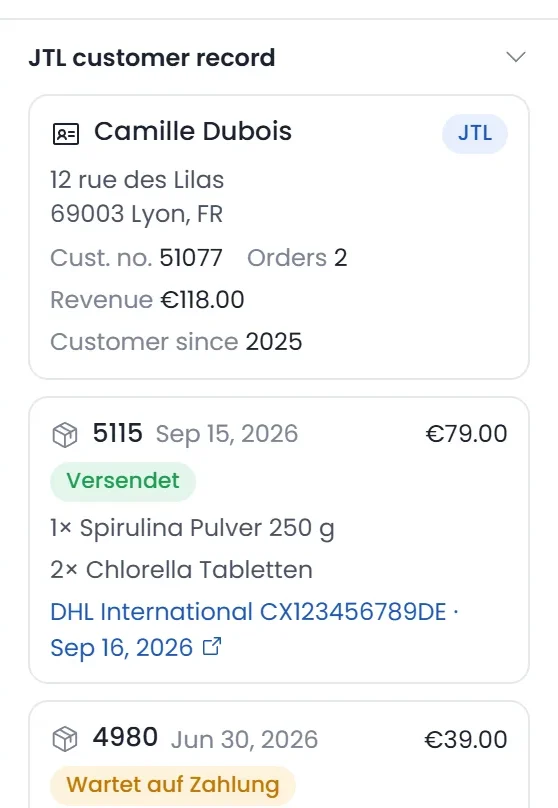
Orders, parcels, invoices, revenue and customer number from the Wawi, without opening the Wawi. The record builds as soon as Talkward recognises the customer, by email address, phone number or a verified order number. You attach the invoice from here with one click.
- Customer number
- Address
- Revenue
- Orders with status
- Tracking number
- Invoice
- Customer number
- K-10442
- Address
- Rue des Lilas 8, 69003 Lyon
- Revenue
- €412.30 (6 orders)
- Language
- French
Set up in four steps.
The installer guides you through everything. You only need to log in once as administrator on SQL Server; after that the connector runs as a service and updates itself.
Enter the key
Paste the connection key from your Talkward account. It binds the connector to your account and nothing else.
Screenshot to followFind the Wawi
The installer lists SQL instances and tenants, such as eazybusiness. You choose which Wawi and which shops Talkward may see.
Screenshot to followCreate the reader
It creates a dedicated SQL login with read-only rights. The password stays encrypted on your server.
Screenshot to followSelf-test
Wawi version, shops and a test query. Green in the installer and in Talkward, and you are live.
Screenshot to follow
GREYHOUND or Talkward?
JTL discontinued the JTL Servicedesk on 31 January 2025 and recommends GREYHOUND instead, which is now part of the JTL group. Here is where the two differ, in short.
As of 25 September 2026, GREYHOUND details according to its offer and JTL pages, prices net. Sources: GREYHOUND: trial and prices, GREYHOUND: JTL integration, JTL guide: Servicedesk discontinued.
- Customer record from the Wawi in the inbox, from Basic
- Invoice copies as PDF, with one click from the chat or by the AI
- Order lookup by the AI, together with the AI agent from Professional
- Connector with automatic updates, cancel monthly
- Servers in Nuremberg (ISO 27001)
- Data processing agreement
- AI replies labelled (EU AI Act)
- Extensions cancellable monthly
Questions about the JTL integration
Question not listed? Write to us at hey@talkward.app.
Which JTL-Wawi versions are supported?
The connector reads the order tables that exist since JTL-Wawi 1.6. Older versions are not connected.
Where do I install the connector?
On the machine running SQL Server, or on another Windows machine in the same network. For hosted Wawi setups, install it on the remote machine.
Can the AI send invoices from the Wawi?
Yes. When a customer asks for their invoice, Talkward fetches the PDF of the existing invoice from the Wawi via the connector and attaches it, by chat, email or WhatsApp. Your team attaches it with one click from the customer record. Talkward never creates new invoices, and the copy only goes to the verified sender address or into a conversation with a verified order number.
Can Talkward write anything into my Wawi?
No. The connector uses a login with read-only rights and only knows a fixed list of read queries. It logs every request locally, without content, so you can see what was asked.
What happens when the connector is offline?
The AI tells the customer it cannot look things up right now and hands over to your team. A notice appears in the inbox.
I run several shops in one Wawi.
Each shop can become its own brand in Talkward, with its own inbox, widget and AI agent. How many brands are included depends on the plan; more are available as an extension.
What does the JTL integration cost?
The “JTL-Wawi” extension costs €39 per month, available from Basic. Order lookup by the AI also needs the AI agent from Professional. All prices are provisional and net.
What about the JTL Servicedesk?
JTL discontinued the Servicedesk on 31 January 2025 and recommends GREYHOUND. If you are switching from it, Talkward gives you the Wawi integration without an open port plus AI agent and LiveTranslate without additional packages.
Goes well with
 Billbee integrationOrders, customer record and invoices from Billbee with your API access. Nothing to install.
 WooCommerce integration“Talkward for WooCommerce” plugin: order status for the AI and customer record, connected with one click, even behind Cloudflare.
 Shipment tracking“Where is my parcel?” answered by the AI with status, carrier and tracking link from your source.
 Zapier integrationHandovers in Slack, complaints in Sheets, orders as WhatsApp: over 7,000 apps, no code.
- All integrationsShop, ERP, marketplaces, shipping and service
Secureyour seat.
Three details, no commitment. We will get back to you personally within two working days.